
Learn how you can apply the AI-Driven Development Lifecycle (AI-DLC) methodology with Kiro and ABAP Accelerator to build SAP ABAP applications on S/4HANA, from business intent to running code in hours instead of weeks.
Introduction
Organizations running SAP maintain thousands of custom ABAP programs that power critical business processes. Whether you are building new applications on SAP S/4HANA, modernizing legacy code, or adopting clean-core development practices like RESTful ABAP Programming Model (RAP), the challenge remains the same: traditional development cycles are slow, documentation is scarce, and the gap between business intent and running software remains wide.Current approaches to AI in SAP development fall into two extremes. AI-assisted development treats AI as a helper for isolated tasks like code completion and documentation, but the overall process remains human-driven. AI-autonomous development hands full control to AI, which breaks down when faced with the complexity of enterprise SAP systems. Neither approach delivers the velocity and quality that SAP teams need.
In this post, you walk through building a Flight Booking application on SAP S/4HANA using the AI-Driven Development Lifecycle (AI-DLC) methodology with Kiro and ABAP Accelerator. You follow the complete AI-DLC workflow — from capturing business intent through the Inception phase, generating ABAP code in the Construction phase, and configuring services in the Operations phase with AI driving the process and you providing oversight at every step.
Solution overview
The following diagram illustrates the AI-DLC methodology and how it applies to SAP ABAP development.
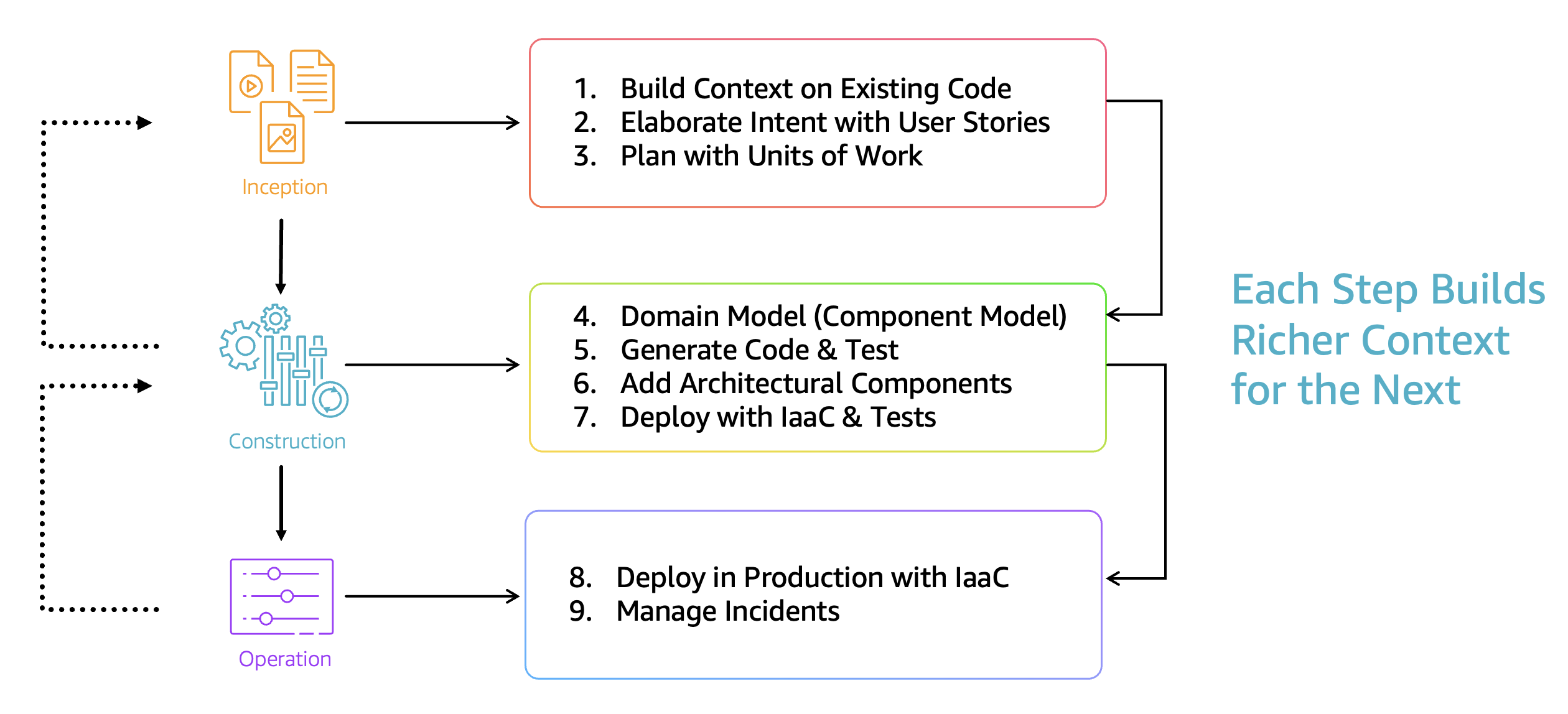
AI-DLC is a methodology that places AI at the center of every development activity while keeping you in the driver’s seat. AI generates detailed plans, raises questions when uncertain, and waits for your approval before proceeding.
Instead of you prompting AI to complete tasks, AI initiates workflows, proposes solutions, and asks for your validation at critical decision points.The methodology operates through three phases:
- Inception – AI transforms your business intent into elaborated requirements, user stories, and units of work through a collaborative process called Mob Elaboration.
- Construction – AI proposes architecture, domain models, and code while you provide direction on technology choices and architectural decisions through Mob Construction.
- Operations – AI manages deployments and service configuration with your oversight.
Each phase builds on the context generated by the previous one, enabling AI to provide increasingly informed suggestions as the project progresses.
For a deeper understanding of the AI-DLC methodology, its principles, and mental models, refer to the AI-DLC white paper and the AI-DLC blog post.
How AI-DLC works with SAP
AI-DLC is a methodology; you can apply it with any AI-capable IDE that supports structured workflows and system integration. In this walkthrough, you implement AI-DLC for SAP development using KIRO:
- Kiro With AI-DLC workflows – An AI-powered IDE with structured workflows that orchestrate the AI-DLC phases, manage context across sessions, and maintain an audit trail of all decisions.
- ABAP Accelerator – A Model Context Protocol (MCP) server that bridges your IDE to the SAP system, enabling AI-powered code generation, syntax validation through SAP ABAP Test Cockpit (ATC), object activation, and deployment directly to your S/4HANA environment.
Together, these tools create a workflow where you describe what you want to build in natural language, AI decomposes it into requirements and code, ABAP Accelerator deploys and validates the code against your live SAP system, and you approve each step before proceeding.Your development workstation runs Kiro with ABAP Accelerator configured as an MCP server, connecting to your SAP S/4HANA system through ABAP Development Tools (ADT) APIs over HTTPS. You can apply this workflow against non-production SAP environment where you have developer authorization.
Prerequisites
Before you begin, confirm the following:
- An SAP S/4HANA system with an SAP HANA database
- An SAP user with developer authorization, including access to transaction SICF (Internet Communication Framework service configuration) and the ability to create objects in the $TMP package
- Kiro installed and configured with ABAP Accelerator as an MCP server and the AI-DLC steering files set up in your workspace
- SAP GUI or SAP Web GUI access for manual configuration steps during the Operations phase
For ABAP Accelerator installation and setup, follow the instructions in the ABAP Accelerator repository.
Walkthrough: Building a Flight Booking application with AI-DLC
In this walkthrough, you apply the AI-DLC methodology to build a Flight Booking application on SAP S/4HANA. The application supports flight search, booking management with cancellation and refund capabilities, passenger information capture, and e-ticket generation, all built with Object-oriented ABAP (ABAP OO) backend classes, REST APIs via HTTP handlers, CDS views for data access, and a JSON helper utility class.
Step 1: Initiate the workflow
To begin, open Kiro and paste your business intent as a natural language description. The intent statement describes what you want to build, the functional scope, technical requirements, and what is explicitly out of scope. The following is an example intent statement. Adapt it to match your specific requirements and SAP environment:
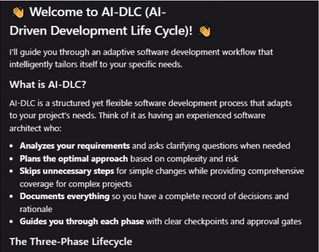
Once you submit the intent, Kiro recognizes this as a new application development request and proposes the next step, requirement analysis. At this point, select your preferred model and coding mode in Kiro to proceed.The AI-DLC workflow follows a consistent pattern throughout each phase:
- Kiro asks strategic questions to clarify requirements, architecture, and implementation details.
- It creates files with Answer: tags where you provide your responses.
- Kiro proposes solutions based on your answers.
- You review and approve or refine before Kiro proceeds.
This cycle repeats until each phase is complete. Kiro also creates an audit.md file that documents decisions, providing a persistent record.
Step 2: Inception phase — from intent to requirements
The Inception phase focuses on transforming your business intent into well-defined requirements through Mob Elaboration. In a real-world scenario, your entire team participates in this session. Product owners, developers, and architects converging in real-time to validate Kiro’s proposals.Kiro begins by generating a set of requirement verification questions to clarify ambiguities in your intent statement. These questions cover functional scope, business rules, edge cases, and technical constraints. You answer each question using the Answer: tags in the generated file and save it. After reviewing your answers, Kiro produces a requirements summary that captures the agreed-upon scope.Once you approve the requirements, Kiro decomposes the intent into Units of Work, cohesive, independently buildable functional blocks such as Flight Search, Booking Management, Payment Processing, and Passenger Management. Each unit contains user stories with acceptance criteria. Kiro also generates a summary of the business intent and expected benefits. You review these artifacts, adjust where needed, and approve to move into the Construction phase.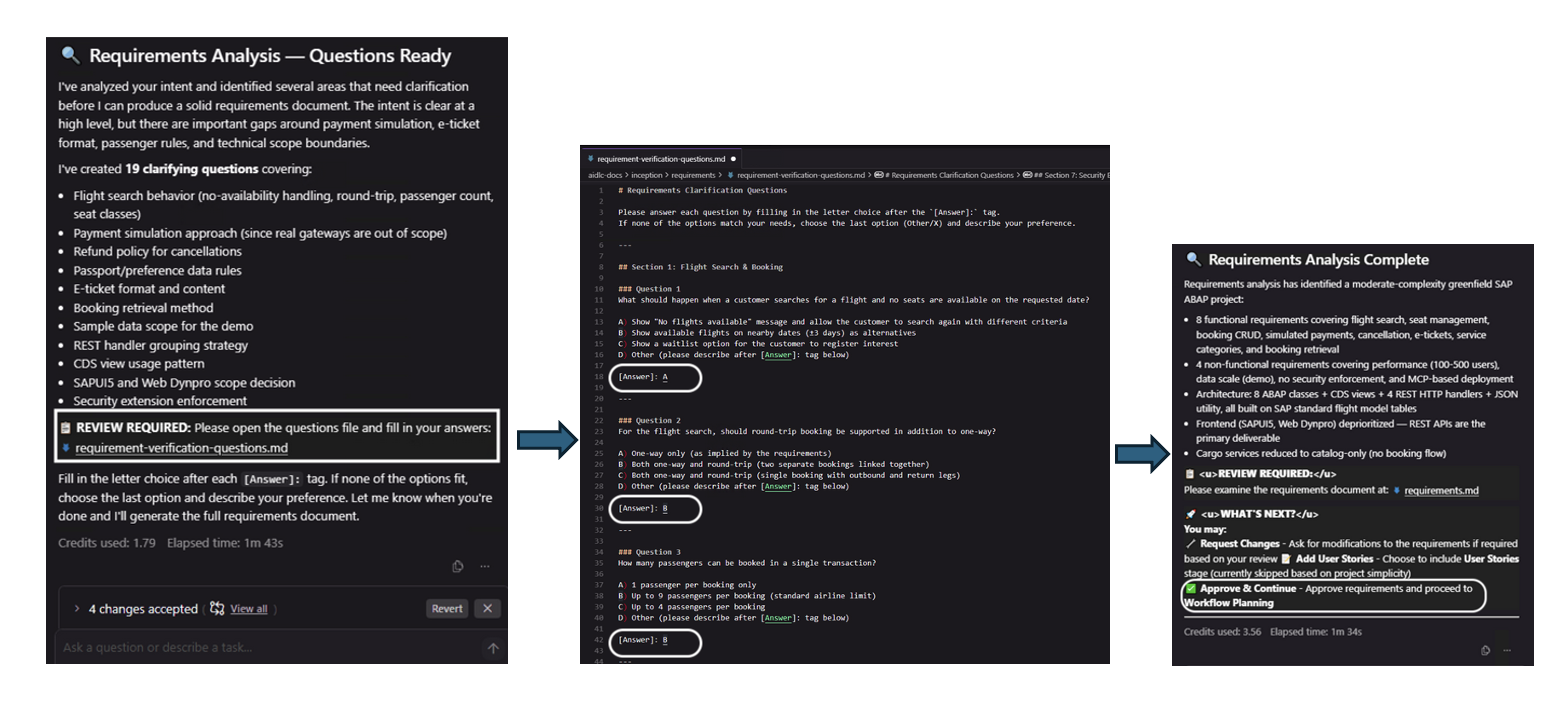
Note: The screenshots are for illustrative purposes. Your output will vary based on your specific intent statement, answers, and decisions throughout the workflow.
Step 3: Construction phase — from requirements to code
The Construction phase transforms your validated requirements into working ABAP code through a structured sequence of design and generation steps.
Application design
Kiro begins by translating your requirements into a technical design. It models the core business logic using domain-driven design principles, identifying entities, their relationships, and the architectural patterns needed to meet your non-functional requirements. You review the design output carefully. This is where you validate that Kiro’s interpretation of your business logic is correct before any code is generated.
Unit generation and code generation
With the design approved, Kiro generates Units of Work and begins code generation, starting with the foundational units and progressing through dependent ones. ABAP Accelerator plays a critical role here. It creates ABAP objects directly in your SAP system, runs syntax checks, executes ATC validations against your custom variants, and handles object activation automatically. If ATC identifies issues with the generated code, ABAP Accelerator remediates the code and iterates through multiple cycles until checks pass.
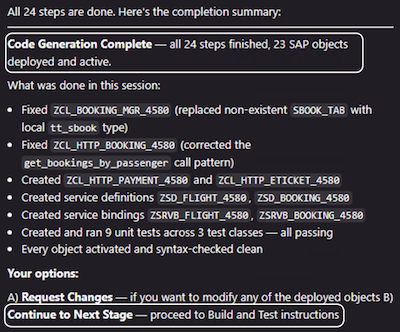
Note: The screenshots are for illustrative purposes. Your output will vary based on your specific intent statement, answers, and decisions throughout the workflow.
Throughout this process, you review the generated code and test scenarios. Every participant’s workflow is unique because AI-DLC tailors the sequence and approach based on your specific answers and decisions during the Inception phase. The construction phase concludes with a summary of the generated artifacts – ABAP classes, HTTP handlers, CDS views, and test cases, deployed and activated in your SAP system.
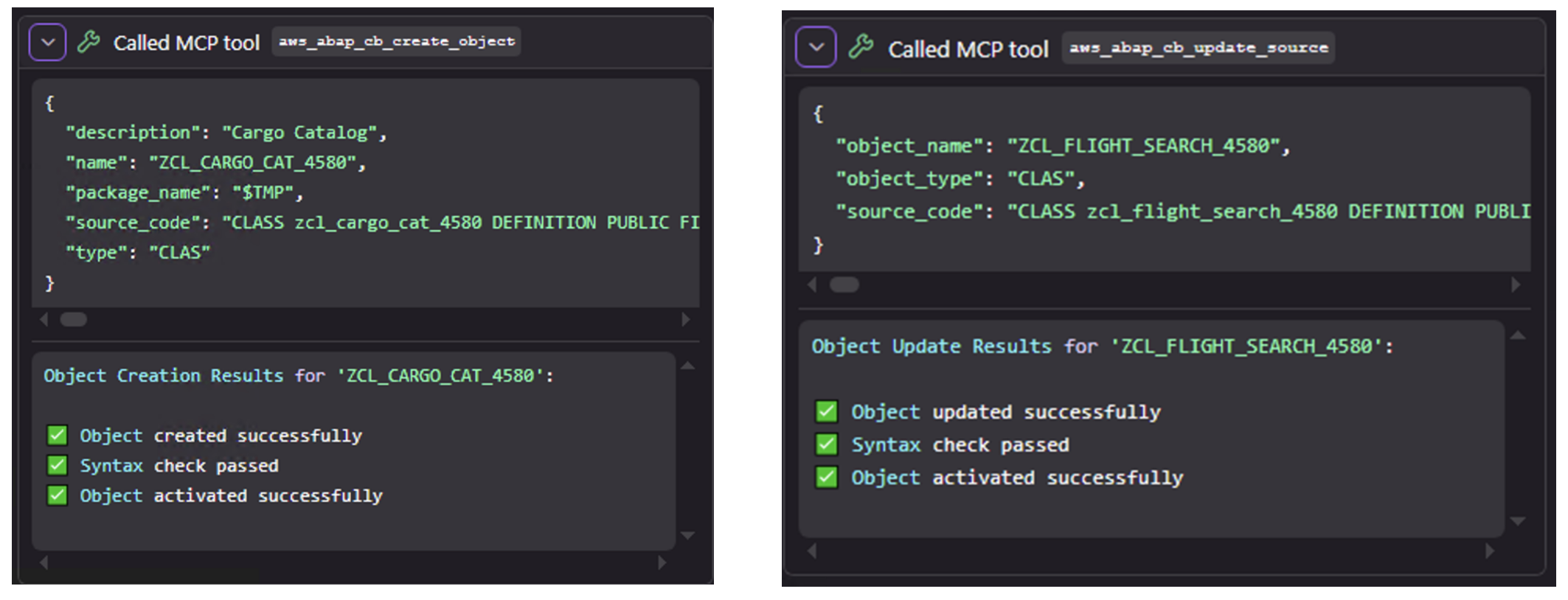
Note: The screenshots are for illustrative purposes. Your output will vary based on your specific intent statement, answers, and decisions throughout the workflow.
Step 4: Operations phase — from code to running services
The Operations phase transforms your working application into a running system. SAP deployment differs from typical cloud-native workflows. It relies on the ABAP transport system, object activation sequences, and Internet Communication Framework (ICF) service configuration rather than continuous integration and continuous delivery (CI/CD) pipelines.
ICF service configuration
To expose your ABAP HTTP handlers as REST APIs, you configure ICF service nodes in SAP. While ABAP Accelerator handles code generation and activation, ICF service node creation requires manual steps in SAP transaction SICF. Kiro provides detailed instructions for each service you need to create, including the service names and handler class assignments. Follow the guidance Kiro provides to create, configure, and activate each ICF service.After you configure and activate the ICF services, inform Kiro that the services are ready. Kiro validates the configuration and marks the Operations phase as complete.
Step 5: Test the application
With your ICF services activated, you can test the application end-to-end. Ask Kiro to generate a simple frontend to test your APIs. Verify that the base URL matches your SAP system and that the ICF service paths align with your SICF configuration. Test each API in sequence. Start with read and search operations, then create operations, followed by dependent operations, and finally cancel and delete operations.
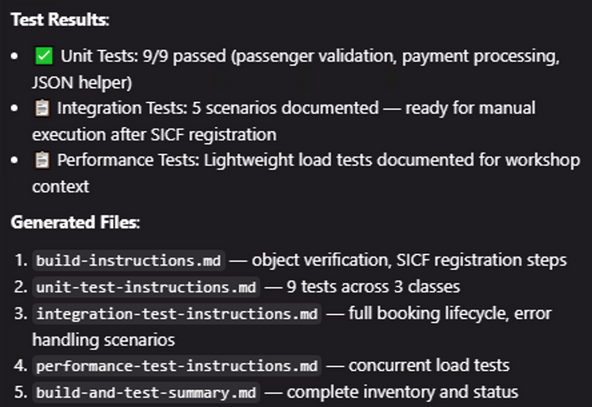
Note: The screenshots are for illustrative purposes. Your output will vary based on your specific intent statement, answers, and decisions throughout the workflow.
Key capabilities demonstrated
This walkthrough demonstrates several capabilities that differentiate AI-DLC from traditional SAP development approaches.Instead of you writing code and asking AI for help, AI proposes plans, asks clarifying questions, and implements solutions only after you validate them. This pattern repeats for every activity, from requirements elaboration to code generation to testing, creating a consistent, auditable workflow.ABAP Accelerator provides system-aware code generation by connecting directly to your SAP environment. It performs syntax checks, runs ATC validations, and handles object activation automatically. Because AI validates code against your live system, generated code is more likely to meet both SAP standards and your organization’s guidelines.Every decision, answer, and approval is captured in structured files within your project repository. This creates a persistent context that AI references across phases, and a permanent audit trail that your team can review at any time.Context accumulation across phases is another key advantage. Because each phase builds on the artifacts from the previous one, AI’s suggestions become increasingly informed as the project progresses. By the time you reach code generation, AI has the context of your requirements, design decisions, and architectural choices.
Benefits
By applying AI-DLC to SAP development, you can accelerate your development velocity. AI handles routine planning, design scaffolding, and code generation while you focus on validation and decision-making. This shifts your time from repetitive coding tasks to critical problem-solving and business logic refinement. Quality improves because AI consistently applies your organization’s coding standards, design patterns, and security requirements through ABAP Accelerator’s ATC integration. Continuous clarification throughout the workflow helps confirm that you build what you intend, rather than an abstract AI interpretation of your requirements. The generated test suites become permanent assets for regression testing throughout the application lifecycle.The approach also reduces the learning curve for modern SAP development practices. Whether you are adopting RAP, transitioning to S/4HANA, or building new applications, AI-DLC guides the process while explaining the decisions behind each implementation step.
Best practices for AI-DLC with SAP
When writing your intent statement, be specific about your functional requirements, technical constraints, and what is explicitly out of scope. The more precise your intent, the fewer clarification cycles AI needs, and the more accurate the generated artifacts. Include details about your target SAP environment, preferred programming model, and organizational coding standards.
During the Inception phase, invest time in answering AI’s clarification questions thoroughly. These answers form the foundation for everything that follows requirements, design, and code. Fill in the Answer: tags thoughtfully, as they create a permanent record that AI references throughout the project.
In the Construction phase, review each generated artifact before approving. Pay particular attention to domain models and architectural decisions, as these shape the entire codebase. If AI’s proposal doesn’t align with your expectations, provide specific feedback rather than generic corrections. The more targeted your feedback, the faster AI converges on the right solution.
For the Operations phase, refer to the build instructions that Kiro generates during the Construction phase. These instructions document the service names and handler class assignments you need for ICF configuration. Verify each entry against the generated code before activating services in SICF.
When scaling AI-DLC across your SAP landscape, start with a pilot application to familiarize yourself and your team with the workflow. Capture lessons learned and refine your intent statement templates for common application patterns. As you build experience, you can apply AI-DLC to increasingly complex scenarios, from new application development to legacy modernization and S/4HANA migrations.
Cleanup
After completing the walkthrough, deactivate the ICF services you created in transaction SICF if they are no longer needed. Remove ABAP objects from the local package ($TMP) through the SAP system.
Conclusion
In this post, you learned how to apply the AI-DLC methodology with Kiro and ABAP Accelerator to build a complete SAP ABAP application from a business intent statement. The workflow took you through the Inception phase where AI elaborated your requirements, the Construction phase where AI generated and deployed ABAP code with system-aware validation, and the Operations phase where you configured ICF services to expose your application as REST APIs.AI drives the workflow while you provide oversight and make critical decisions. Combined with ABAP Accelerator’s direct integration with your SAP system, this approach can significantly reduce development time while maintaining code quality through continuous ATC validation and automated testing.The approach demonstrated in this post applies beyond new application development. You can use the same AI-DLC workflow with ABAP Accelerator for SAP ECC to S/4HANA code conversions, legacy ABAP modernization, RAP adoption, and custom development on clean-core S/4HANA. The principles remain consistent: AI-driven planning, human validation, system-aware code generation, and continuous quality checks. Get started with the resources below.
Next steps
To get started with AI-DLC for SAP development, explore the following resources.
- Read the AI-DLC white paper for a comprehensive understanding of the methodology.
- Install ABAP Accelerator and connect it to your SAP environment.
- Download Kiro and configure it with the AI-DLC workflows.
- Follow the SAP ABAP Application Development with AI-DLC workshop for a guided, hands-on experience.
Connect with your AWS account team to discuss how AI-DLC can be tailored to your organization’s SAP development needs.
About the authors

Ankit Srivastava
is a Strategic Technical Account Manager at Amazon Web Services (AWS), where he serves as a trusted advisor to global enterprise customers. With over 15 years of experience in cloud architecture, DevOps and distributed systems, Ankit helps organizations navigate cloud transformation, architecture modernization, and harness the power of Generative AI on AWS.






.png)

![[속보] 北, 韓·EU성명에 “체제존중 위장 내던져…韓 적대 원칙 불변”](https://pimg.mk.co.kr/news/cms/202606/13/news-p.v1.20260613.89255ddca2b0487c98e7f979e85a8a39_R.jpg)




 English (US) ·